
A DStv decoder can be switched on, the television can be working perfectly, and yet the screen suddenly shows “No Signal”. Sometimes the picture returns after a few minutes. Other times, every channel remains unavailable even after restarting the decoder.
The frustrating part is that the message does not tell you exactly what has gone wrong. A signal problem can start outside the house at the satellite dish, somewhere along the cable, at the LNB, or closer to the decoder and television. In Cape Town, weather and exposure can also play a role, particularly where outdoor satellite equipment has been affected by wind or heavy rain.
The good news is that a “No Signal” message does not automatically mean that your decoder needs replacing. The cause needs to be identified first.
DStv Connect provides DStv installation, repairs, signal troubleshooting, satellite dish alignment, decoder upgrades and related services for homes, businesses and multi-unit properties in Cape Town and surrounding areas. The company’s approach is to assess the existing setup, including the dish, LNB, cabling, connectors, signal levels and equipment, before determining what work is actually required.
Request DStv Signal Troubleshooting
Having trouble getting your DStv signal back? Fill in the form below to request professional fault finding for your existing DStv installation.
What Does “No Signal” Actually Mean?
“No Signal” is a description of what your equipment is experiencing, rather than a diagnosis of the fault.
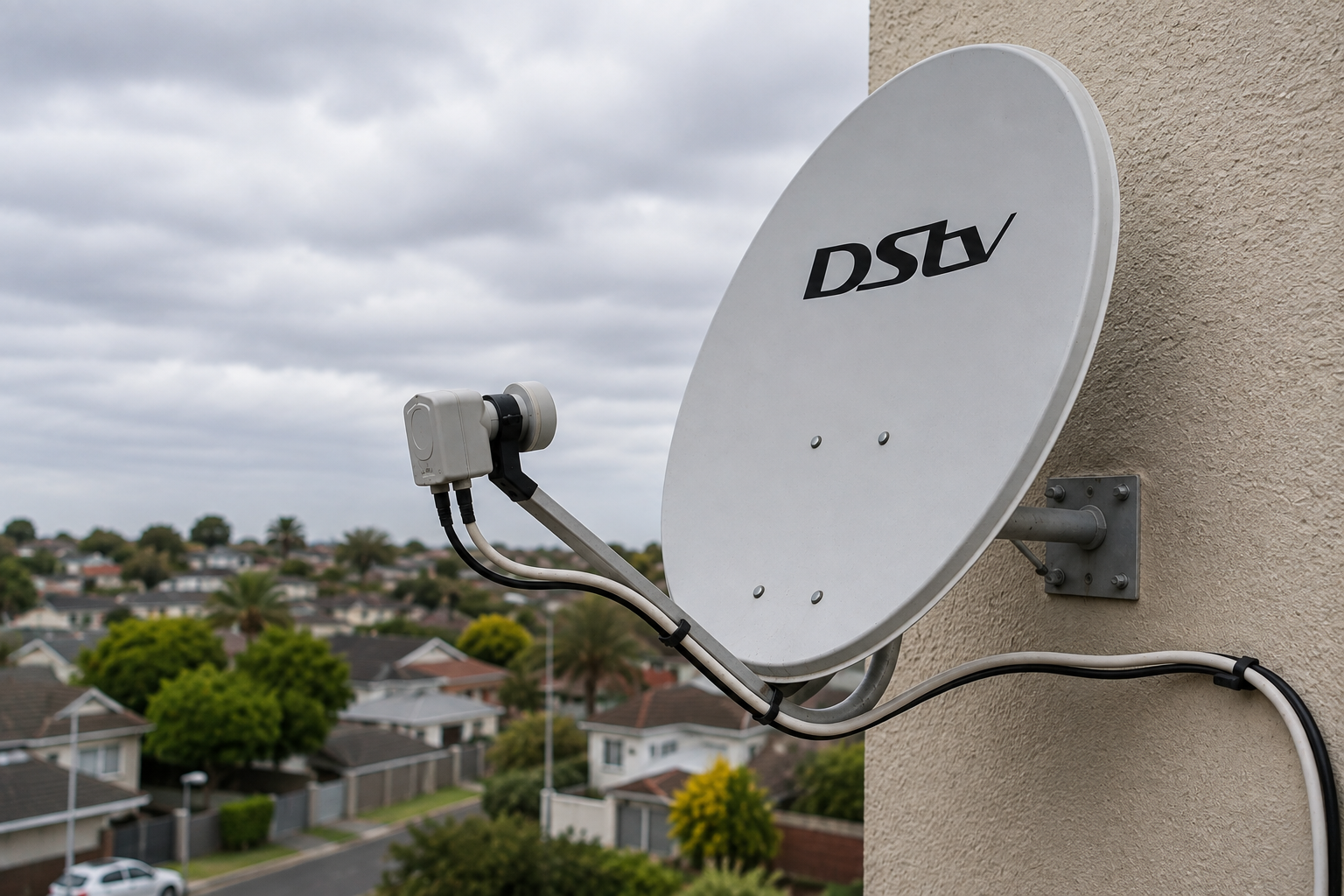
A DStv system relies on several components working together. The satellite dish receives the broadcast signal, the LNB mounted on the dish processes it, and the signal travels through coaxial cable to the decoder. The decoder then processes the incoming information so that your television can display the channels.
A problem affecting any of those stages can result in lost reception.
That is why two households can see exactly the same “No Signal” message while needing completely different solutions. One may have a loose connection behind the decoder. Another may have a damaged outdoor cable. Someone else may have a satellite dish that has shifted slightly after strong wind.
There is also an important distinction between a DStv satellite signal problem and a television input problem. If the television itself is not receiving the decoder’s output, the issue may involve the HDMI cable or the selected TV input rather than the satellite signal.
Before replacing anything, it is therefore worth establishing where the signal is being lost.
1. Heavy Rain Can Cause Temporary Signal Loss
Heavy rain is one of the most obvious causes of satellite television reception problems.
Satellite signals travel a considerable distance before reaching the dish at your property. Intense rainfall can interfere with reception, particularly during periods of very heavy precipitation. You may notice the picture becoming pixelated, freezing, disappearing completely or returning intermittently.
A temporary interruption during an unusually heavy downpour is not necessarily evidence that your DStv equipment has failed.
The more useful question is what happens after the rain stops.
If your picture returns to normal once the weather clears, the interruption may have been temporary. If the system continues showing “No Signal” long after the rain has passed, however, another problem may be involved.
Repeated rain-related signal loss can also point towards an underlying weakness in the installation. A dish that is slightly out of alignment, an ageing LNB, poor-quality connections or deteriorated cabling may make an installation more vulnerable to reception problems.
In that situation, blaming the weather alone can mean overlooking a fault that needs attention.
2. Strong Wind Can Affect Satellite Dish Alignment
A satellite dish has to be positioned accurately to receive the intended signal. It is not enough for the dish to simply be pointing approximately in the correct direction.
Strong wind can put pressure on the dish, its mounting bracket and the surface to which it is attached. If the mounting becomes loose or the dish shifts, even slightly, reception can deteriorate.
This can be particularly noticeable after a period of strong Cape Town winds.
You may find that the DStv was working normally before the weather changed, followed by pixelation, missing channels or a complete loss of signal afterwards.
It is tempting to push the dish back into position yourself, but that is not a good way to approach the problem. Satellite alignment is precise, and moving the dish without measuring the signal can leave it further away from the correct position.
A proper inspection can determine whether the dish has moved, whether its mounting remains secure and whether realignment is necessary. DStv Connect specifically offers satellite dish installation and alignment as part of its DStv services.
3. A Loose Cable or Connector May Be Interrupting Reception
The satellite dish and decoder are connected by cabling, and a problem with that connection can be enough to cause a complete loss of signal.
This is particularly easy to overlook because the cable itself may appear fine from the outside.
Connections can become loose over time, particularly if equipment has been moved. A television stand may have been rearranged, the decoder may have been pulled forward for cleaning, or someone may have disconnected and reconnected equipment without realising how important the connection is.
Outdoor sections of cable have additional exposure to weather and environmental conditions. Damaged insulation, moisture ingress, deterioration or poorly secured connections can eventually affect signal transmission.
If the problem started shortly after moving your television or decoder, check the accessible connections carefully.
Do not pull hard on the cable or attempt to force a connector into place. If a connector is damaged or the cable appears compromised, replacing or repairing the affected section may be more appropriate than repeatedly restarting the decoder.
4. The LNB Could Be Faulty
The LNB is the small component attached to the arm of the satellite dish. Although it is easy to ignore because it is outside and relatively small, it plays a critical role in receiving and processing the signal picked up by the dish.
Because it is outdoors, an LNB is exposed to sun, wind, rain and changing temperatures.
An LNB can develop faults over time. The symptoms may include intermittent signal loss, poor reception, missing channels or a complete failure to receive the satellite signal.
A faulty LNB does not necessarily look damaged from the ground. There may be no obvious crack or visible sign that something is wrong.
This is one reason replacing the decoder as a first step can be wasteful. If the fault is actually at the dish or LNB, a new decoder is unlikely to solve it.
Professional signal troubleshooting should consider the condition and performance of the LNB alongside the other components of the installation.
5. Your Satellite Dish May Be Slightly Misaligned
Dish alignment deserves particular attention because a dish can look perfectly normal while still being positioned incorrectly.
It does not need to be dramatically moved for reception to deteriorate. A small change in angle can affect the signal received by the dish.
Several things can contribute to alignment problems. Strong winds are an obvious possibility, but the mounting point itself can also become loose or deteriorate over time. Physical interference around the dish may also affect the installation.
A dish that was installed correctly years ago is not necessarily guaranteed to remain perfectly positioned forever.
If your DStv signal became unreliable after a storm, strong wind or other physical disturbance, dish alignment should be considered.
This is different from simply tightening something and hoping for the best. Accurate alignment requires checking the signal rather than positioning the dish by eye.
DStv Connect’s installation services include secure dish mounting and accurate signal alignment, while its troubleshooting service is intended to identify faults affecting an existing DStv system.
6. Something May Be Obstructing the Satellite Dish
The environment around your dish can change over time.
A tree that was small when the satellite dish was installed may eventually grow into the area in front of it. New structures, extensions or other construction can also alter the surroundings.
This matters because satellite reception depends on a suitable path between the satellite and the dish.
You may therefore experience a problem even though nobody has touched the dish itself.
Look at whether anything has changed around the installation since the DStv was working reliably. Has a large tree grown substantially? Has a new structure been built? Has an object been installed close to the dish?
Do not climb onto a roof or unstable structure to investigate. A satellite signal problem is not worth risking a fall. If the dish is difficult to access safely, let a qualified technician inspect it.
7. The Problem Could Be With the Decoder or Its Connections
Not every problem involving a blank television screen originates at the satellite dish.
The decoder needs to receive the satellite signal, process it and send the resulting picture to the television. A fault or connection problem closer to the decoder can therefore produce a viewing problem that looks similar to a satellite issue.
Start by checking whether the decoder is powered on normally.
Then check the connection between the decoder and television. If the television is displaying a message such as “No Signal” from its own input system, rather than a DStv signal message, check that the correct HDMI input has been selected.
For example, your television might be set to HDMI 2 while the decoder is connected to HDMI 1. In that case, the television is effectively looking at the wrong source.
This is why identifying exactly where the “No Signal” message appears and what the decoder is displaying can make troubleshooting much easier.
8. A Recent Move or Installation Change Could Be Responsible
DStv problems can appear after equipment has been moved or an installation has been modified.
Perhaps the television was moved to another room. Maybe the decoder was relocated, cables were rerouted or a different viewing point was added.
Moving equipment creates opportunities for cables and connectors to be disturbed. If the satellite dish itself has been moved or reinstalled, accurate alignment becomes particularly important.
DStv Connect provides relocation and reinstallation services, including removal, installation and signal setup when moving a DStv system to a new home, office or another position on a property.
If the “No Signal” problem appeared immediately after installation or relocation work, the timing itself is useful information and should be mentioned when arranging an inspection.
9. An Additional TV Point or XtraView Setup Can Have Its Own Faults
More complicated DStv installations have more components that can potentially affect reception.
A home with multiple viewing points, XtraView or additional cabling may have signal distribution equipment and more cable connections than a basic single-decoder setup.
That means a fault affecting one viewing point does not necessarily mean the entire satellite dish has failed.
For example, if one television has lost reception while another continues working, the problem may be closer to the affected viewing point rather than at the dish itself.
This distinction can save time during troubleshooting. Instead of assuming the entire DStv installation has failed, the technician can determine whether the problem is isolated to a particular cable, connection, decoder or distribution point.
DStv Connect also installs XtraView systems and additional DStv TV points, as well as communal and commercial systems for properties where multiple viewing points need to be supported.
What Can You Safely Check Yourself?
There are a few basic checks worth trying before arranging professional assistance. These are most useful when the equipment is easily accessible and you do not need to climb onto a roof or interfere with the dish.
- Check that the decoder is powered on and that the television is set to the correct input.
- Check the accessible cable connections between the decoder and television.
- If the problem started during very heavy rain, wait for the weather to improve and see whether reception returns.
- Restart the decoder and observe whether the problem remains after it has fully powered back up.
- Take note of whether all channels are affected or only certain channels.
- Think about whether the problem began after strong wind, moving the television, changing cables or doing work around the property.
These checks can help identify obvious problems, but they cannot replace proper signal testing.
Most importantly, do not climb onto the roof to adjust the satellite dish yourself. You could injure yourself, damage the dish or make the alignment worse.
Request Professional DStv Fault Finding
Still seeing “No Signal” after checking the obvious connections? Complete the form below to request an assessment of your DStv installation and identify the likely source of the problem.
When Is a DStv “No Signal” Problem More Than a Temporary Interruption?
A temporary loss of reception during severe weather is different from a system that repeatedly loses signal under ordinary conditions.
If the signal returns as soon as heavy rain passes and the system otherwise performs normally, there may not be a serious equipment fault.
Persistent or recurring problems deserve more attention.
For example, you should consider professional troubleshooting if the decoder continues showing no signal after the weather has cleared, the problem keeps returning, the signal disappeared after strong winds, or one or more viewing points have stopped working unexpectedly.
The same applies if you have already checked the accessible connections and restarted the equipment without success.
Repeatedly switching the decoder off and on may temporarily change the symptoms, but it cannot correct a misaligned dish, failing LNB, damaged cable or poor connection.
A proper assessment is more useful because it looks at the installation as a system.
DStv Connect states that its assessment can include checking the satellite dish, LNB, cabling, connectors, signal levels, decoder compatibility and installation area before recommending the appropriate work.
Why Replacing the Decoder May Not Fix the Problem
A “No Signal” message can make the decoder an obvious suspect, but the decoder is only one part of the installation.
Imagine that a satellite dish has shifted slightly after strong wind. Replacing the decoder would leave the underlying dish alignment problem untouched.
The same applies to a damaged cable or faulty LNB. A new decoder cannot compensate for a satellite signal that is not reaching it correctly.
This is why fault finding should come before unnecessary equipment replacement.
A technician can determine whether the existing decoder is actually the problem or whether the fault lies elsewhere. In some cases, the solution may be relatively straightforward, such as correcting a connection or realigning the dish.
In others, a component may genuinely need replacing.
The difference is important because you should not have to replace functioning equipment simply because the system is displaying a symptom caused by another component.
Why Signal Problems Can Keep Coming Back
Getting the picture back once does not necessarily mean the underlying issue has been resolved.
Consider a dish that has become loose. It may be adjusted temporarily, only to move again during the next period of strong wind.
Similarly, an old outdoor cable might continue working intermittently before deteriorating further. An ageing LNB may produce occasional reception problems before eventually failing altogether.
Recurring faults are therefore worth investigating rather than treating as isolated incidents.
The history of the problem can provide useful clues. If your DStv works perfectly on calm, dry days but struggles whenever the weather changes, that pattern is worth reporting. If the problem started after building work or moving equipment, that is relevant too.
Good troubleshooting is not simply about getting the picture back. It is about understanding why the signal was lost in the first place.
Does Cape Town Weather Make DStv Signal Problems More Likely?
Weather can certainly be part of the picture, particularly during periods of heavy rain or strong wind.
However, it would be too simplistic to assume that every DStv signal problem in Cape Town is caused by bad weather.
A healthy, correctly installed satellite system can still experience temporary reception difficulties during severe weather. But persistent problems after the weather has cleared may indicate something else.
The coastal environment and exposure of outdoor equipment also mean that the condition of components matters. The dish, mounting hardware, LNB, connectors and external cabling are all exposed to environmental conditions over time.
This is why a weather-related failure can sometimes be the event that reveals an existing weakness rather than being the sole cause.
For example, strong wind may expose a dish that was already not securely mounted, while heavy rain may reveal a problem with an outdoor connection that had been deteriorating for some time.
What Happens When Professional DStv Troubleshooting Is Needed?
A proper assessment should begin with the existing installation rather than immediately assuming that a particular component needs replacing.
The technician can establish what equipment is being used, inspect the accessible cabling and connections, assess the dish and LNB, and check signal levels. The decoder and its compatibility with the existing setup may also need to be considered.
The location of the equipment matters too. A dish that is difficult to access or positioned in an area affected by new obstructions may require a different solution from a straightforward cable fault.
DStv Connect works with existing DStv systems as well as new installations, and its services cover homes, businesses and multi-unit properties throughout Cape Town and surrounding areas.
The purpose of this assessment is to avoid guessing. Once the source of the problem is established, the appropriate repair, realignment, replacement or installation work can be determined.
When Your DStv Says “No Signal”, Start With the Cause
A DStv “No Signal” message can be caused by something as simple as a loose connection, but it can also point towards a dish alignment problem, faulty LNB, damaged cabling or another issue within the satellite installation.
Weather can make the situation more noticeable, especially during heavy rain or strong winds, but persistent problems should not automatically be dismissed as weather-related.
Start with the safe checks you can perform yourself. Confirm that the television is on the correct input, inspect accessible connections and restart the decoder. Pay attention to when the problem started and whether anything changed beforehand.
If the signal remains unavailable, repeatedly disappears or returns only temporarily, professional troubleshooting can help identify the actual fault.
DStv Connect provides DStv repairs and signal troubleshooting alongside satellite dish installation and alignment, DStv installation, relocations, decoder upgrades, additional TV points and other satellite services in Cape Town and surrounding areas.
The important thing is not to assume that “No Signal” automatically means “new decoder”. The right solution depends on where the signal is being lost and what condition the rest of the installation is in.
Request DStv Signal Repair in Cape Town
If your DStv is still showing “No Signal”, fill in the form below to request professional troubleshooting and find out what is affecting your reception.